
When a coding agent exhausts its context window mid-task, it doesn’t crash. It degrades. Edits start bleeding across files. Variable names drift. The agent confidently produces a PR that looks reasonable on first glance and falls apart under review. The failure mode isn’t “the agent stopped” — it’s “the agent kept going, but worse.”
Token consumption in agentic sessions is a correctness problem, not a cost problem. Context budget is a production SLA.
Chat Habits Are Agent Anti-Patterns
In interactive chat with an LLM, batching multiple questions into one message is sound advice. It avoids resending the entire conversation history with each request. People carry this habit directly into agentic coding: “While you’re in there, also fix the logging in module X and update the README.”
For a coding agent, this is the opposite of helpful. Each additional concern loads code, tests, and reasoning state into the same context window. By mid-session the agent is holding three unrelated changes. Its edits start bleeding across concerns. The human ends up reviewing a PR that mixes a bugfix with a refactor with a docs update — and can’t cleanly revert any of them.
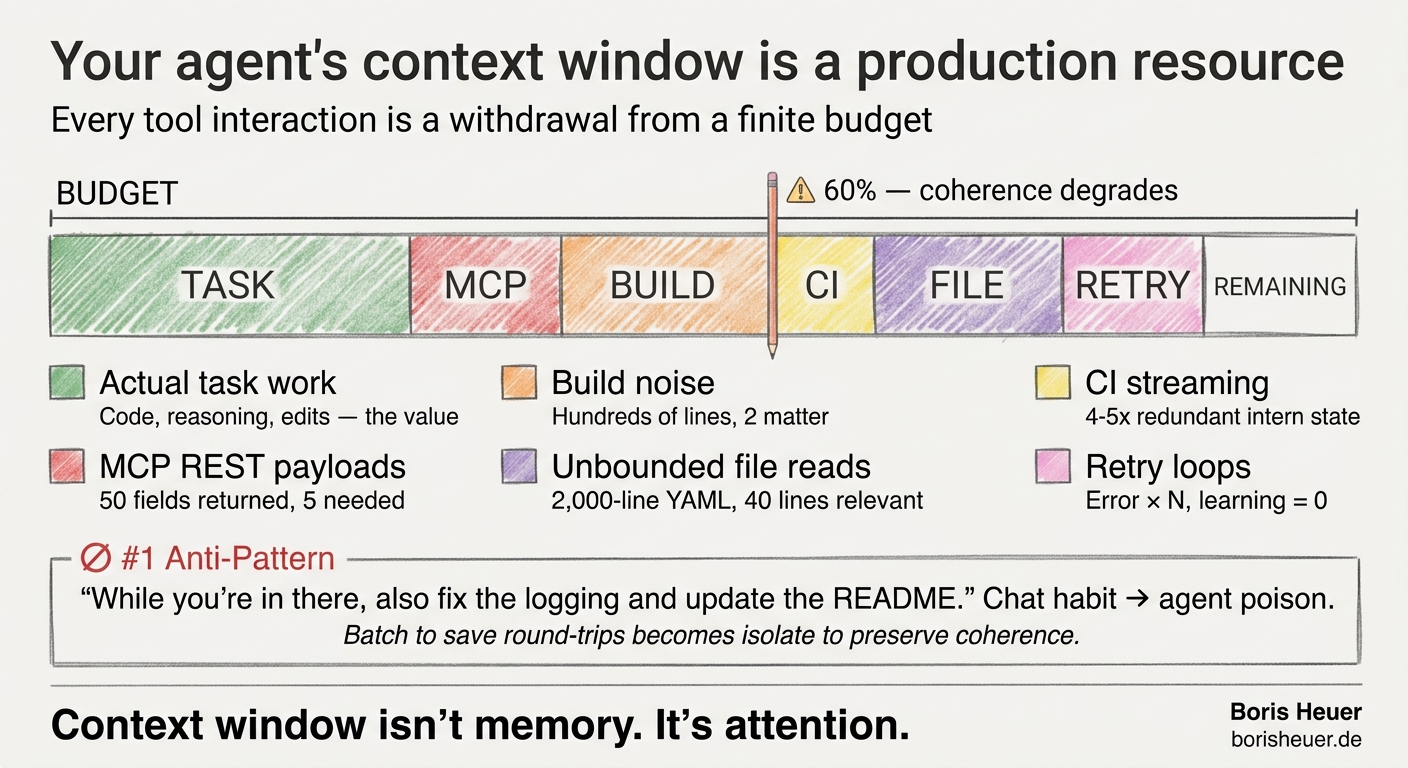
The interaction model that works for chat (batch to save round-trips) is an anti-pattern for agents (isolate to preserve coherence). One issue, one session. When an agent working on issue #42 discovers a related problem in #43, the instinct is to fix both. Don’t. Finish #42, close the session, open a new one. This was learned after sessions that started sharp and degraded into incoherent edits around the 60% context mark.
MCP Tools: Structured, Discoverable, and Wasteful
MCP (Model Context Protocol) is the natural integration point for LLM agents. Structured input/output, typed parameters, discoverable schemas. It’s clean engineering. It’s also, in many cases, a context window drain.
The problem isn’t MCP itself — it’s what happens when MCP wraps a REST API. A single list_issues call against GitHub returns every field on every issue: body, reactions, timeline, assignees, full label objects. The agent needs five fields. It gets fifty. Multiply that by six repositories, run it daily, and the token cost for data the agent never reads becomes the dominant expense in the session.
For the portfolio-sync skill — a daily status report across six repositories — I replaced the MCP list_issues calls with a standalone Python script that hits GitHub’s GraphQL endpoint directly. The query projects exactly five fields: number, title, state, labels, updatedAt. Nothing else crosses the wire.
The script uses urllib — stdlib only, no external dependencies. Inside a sandboxed devcontainer with firewall-restricted network access, this matters. Zero package installation, zero calls to npm or PyPI, automatic proxy support. The agent doesn’t reason about MCP connection state or tool discovery. It runs a script and gets a JSON result.
The pattern generalizes: when an agent repeatedly calls the same MCP tool in a loop, consider replacing it with a purpose-built script that batches the work, projects only needed fields, and returns a single structured result. Same pattern applied to Playwright and GitHub CLI — both preferred over their MCP equivalents because CLI tools give agents composable, pipeable output they can filter with standard Unix tools. MCP tools return structured but verbose objects the agent must parse in-context.
This isn’t an argument against MCP. It’s an argument for being deliberate about where convenience tools earn their token cost and where a targeted script does the same job at 5% of the context overhead.
Delta Caching: Don’t Fetch What Hasn’t Changed
Portfolio sync runs daily. Most repos are quiet on any given day. Without caching, every run fetched all issues from all repos — same data, same token cost, same waste.
The fix is a two-mode fetch system with a persistent JSON cache. The invalidation signal is the commit SHA, not a timer. Compare the latest commit SHA against the cached SHA — if unchanged and the cache is less than 24 hours old, zero API calls for that repo. On a typical day, four of six repos hit this path.
When a repo does have new commits, the fetch is delta-only: issues updated since the last cached timestamp. On a quiet day, that’s a handful of records instead of hundreds. State transitions are handled correctly — GitHub’s filterBy.since returns any issue touched after the timestamp, including newly closed ones. Delta results merge into the cached index by issue number.
The 24-hour ceiling is a safety net, not the primary invalidation mechanism. The SHA comparison means the cache stays valid during weekends or quiet periods without arbitrary expiration, but refreshes immediately when actual work lands.
Before: full REST payloads via MCP, every repo, every run. After: two delta fetches and four cache hits on a typical day. Combined with GraphQL field projection, the token consumption for issue data dropped by roughly 95%.
Every Interaction Is a Withdrawal
The four token efficiency patterns that emerged from running agents daily against real infrastructure all share the same principle: every tool interaction is a withdrawal from a finite budget. Spend it on the task, not on noise.
CI polling — never --watch. gh pr checks --watch streams every intermediate CI state into context: “queued… in_progress… queued… in_progress…” — 4-5x redundant output before the final result. sleep 60 && gh pr checks <PR> produces one result. The human version is perfect for watching a terminal. The agent version is context pollution.
Build noise filtering. A bare dotnet build emits restore logs, informational warnings, NuGet resolution messages — hundreds of lines where the agent needs two: “Build succeeded” or the error line. A grep filter reduces this to signal. When the error is NU1301 (NuGet feed unreachable in the sandbox), the agent aborts immediately rather than reading 40+ cascading errors that all stem from the same root cause.
Bounded file reads. Unknown-length files get read structure-first: 40 lines to scan the shape, then targeted offset reads to reach the relevant section. One 2,000-line workflow YAML dumped unbounded into context can consume 5-10% of the entire session budget for content the agent won’t use.
Abort over retry. When an agent hits a transient failure (network timeout, NuGet feed down, flaky test), the human instinct is to retry. For an agent, every retry multiplies the token cost of the failure. The error output loads into context, the retry output loads on top of it, and if the failure persists, the agent has spent hundreds of tokens learning nothing. Fail fast, report the root cause, let the human decide whether to restart.
None of these are individually dramatic. They compound. A verbose build log here, a streaming status check there, an unbounded file read somewhere else — and the agent hits 60% context utilization before it’s halfway through the task. After that point, coherence degrades and the human has to intervene anyway.
The question worth asking about every tool interaction when optimizing agentic infrastructure: does the agent actually need this output, in this volume, at this granularity?
Context window isn’t memory. It’s attention. And attention that’s spent on noise isn’t available for the work.